
Last updated on
Oct 31, 2026

MN B 104 2010-2026 free printable template
pdfFiller is not affiliated with any government organization

Fill out
Complete the form online in a simple drag-and-drop editor.

eSign
Add your legally binding signature or send the form for signing.

Share
Share the form via a link, letting anyone fill it out from any device.

Export
Download, print, email, or move the form to your cloud storage.
Why pdfFiller is the best tool for your documents and forms


End-to-end document management
From editing and signing to collaboration and tracking, pdfFiller has everything you need to get your documents done quickly and efficiently.
Accessible from anywhere
pdfFiller is fully cloud-based. This means you can edit, sign, and share documents from anywhere using your computer, smartphone, or tablet.
Secure and compliant
pdfFiller lets you securely manage documents following global laws like ESIGN, CCPA, and GDPR. It's also HIPAA and SOC 2 compliant.
What is MN B 104
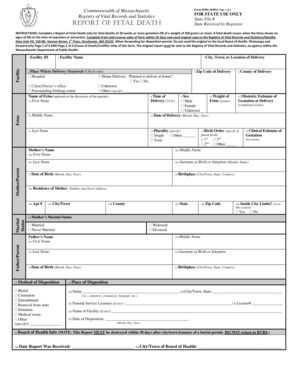
The Birth and Fetal Death Record Form is a government document used by parents in the United States to officially record the details of a child's birth or fetal death.
pdfFiller scores top ratings on review platforms




I love it. I will definitely renew when the time come. The Military offer me a free site for forms filler but I can never open it on my personal computer. I have to use it on the government issued computer.
Works great and has saved me a lot of time.
Who needs MN B 104?
Explore how professionals across industries use pdfFiller.

MN B 104 is needed by:
-
Parents registering their child's birth
-
Healthcare providers documenting fetal deaths
-
State agencies managing vital records
-
Genealogists researching family histories
-
Legal professionals requiring birth documentation
Comprehensive Guide to MN B 104
What is the Birth and Fetal Death Record Form?
The Birth and Fetal Death Record Form serves a crucial role in official record-keeping in the United States. This government form is essential for documenting the details surrounding a child's birth or the occurrence of fetal death. It captures vital information about the mother, father, and child, ensuring that these details are accurately recorded for statistical and legal purposes.
By completing this form, individuals help maintain accurate records that contribute to understanding population dynamics in the U.S. Furthermore, it plays an integral part in legal documentation for families and government agencies.
Purpose and Benefits of the Birth and Fetal Death Record Form
This form is a legal requirement for parents seeking a birth certificate or filing a fetal death report. Completing the Birth and Fetal Death Record Form is vital in establishing the identity of the newborn and fulfilling legal obligations. It also helps uphold accurate population statistics, which are essential for governmental planning and resource allocation.
-
Facilitates access to essential services like social security.
-
Supports insurance claims and health services.
Key Features of the Birth and Fetal Death Record Form
The Birth and Fetal Death Record Form is designed with several key sections and features aimed at simplifying the submission process. Users will find fillable fields and checkboxes that allow for straightforward completion of necessary information.
-
Fields for mother's name, father's date of birth, and ethnic background.
-
Instructions to ensure clarity in filling out the form.
Who Needs the Birth and Fetal Death Record Form?
This form is essential for various individuals and circumstances. Expectant parents need it to document their child's birth, while medical practitioners and legal guardians may use it for official documentation following a fetal death.
The form is also relevant in contexts such as school enrollment, where proof of birth is required.
How to Fill Out the Birth and Fetal Death Record Form Online
Filling out the Birth and Fetal Death Record Form online can streamline the process. Follow these steps for successful completion:
-
Access the online form through your preferred platform.
-
Gather necessary information using the pre-filing checklist.
-
Complete the form by entering information field by field.
-
Review all entries to ensure accuracy before submission.
Common Errors and How to Avoid Them When Filling the Form
Understanding common pitfalls can help ensure the accurate completion of the Birth and Fetal Death Record Form. Users often overlook some fields or enter incorrect data, leading to delays in processing.
-
Double-check all provided information for completeness.
-
Ensure that handwriting is clear on physical forms.
-
Pay attention to the specific instructions for filling the fields.
How to Submit the Birth and Fetal Death Record Form
Once the form is completed, there are several methods for submission. Users can choose from online, mail, or in-person options depending on their preferences and state requirements.
Before submission, it's important to note any associated fees and understand the consequences of late filings. Keeping track of your submission status post-filing is also recommended.
Security and Compliance for the Birth and Fetal Death Record Form
When dealing with sensitive personal information, security is paramount. pdfFiller implements comprehensive measures to ensure data protection while users complete and submit the Birth and Fetal Death Record Form.
The platform complies with regulations such as HIPAA and GDPR, ensuring that users’ privacy is respected throughout the process.
How pdfFiller Can Help You with the Birth and Fetal Death Record Form
pdfFiller offers various features designed to make the process of filling out the Birth and Fetal Death Record Form easier. Users can edit the form online, e-sign it, and securely store their completed documents without the hassle of traditional paperwork.
The user-friendly interface of pdfFiller encourages a smooth experience, making it an excellent choice for anyone needing to fill out this important document.
Next Steps for Your Birth and Fetal Death Record Process
After filling out the Birth and Fetal Death Record Form, take a moment to review it thoroughly before submission. Consider checking the status of your application after it has been submitted to ensure that everything is processed smoothly.
Utilizing pdfFiller can significantly simplify this entire process, making both filling and tracking your form more manageable.
How to fill out the MN B 104
-
1.Access the Birth and Fetal Death Record Form on pdfFiller by searching for it in the template section or using the provided link.
-
2.Open the form in pdfFiller's interface, where you will see the fillable fields and options to navigate through the document.
-
3.Collect the necessary information before starting, including the names of both parents, their dates of birth, addresses, education levels, ethnicity, and any other required details.
-
4.Begin filling in the form by clicking on the blank fields. Ensure you type in clear and accurate information, especially in critical areas like names and dates.
-
5.Utilize the checkboxes for education level and ethnicity by clicking the appropriate box that best describes your situation. Make sure to review your selections.
-
6.Follow any additional instructions provided within the form, such as 'Please Print Clearly.' Ensure to complete each section of the document diligently to avoid missing information.
-
7.Once all sections are filled, conduct a thorough review of the form, confirming all entered data is correct and complete before moving forward.
-
8.To save your work, click the 'Save' button to store your document in pdfFiller. You can also choose to download it in PDF format.
-
9.If submission is required, follow pdfFiller's instructions to electronically submit the form or follow the guidelines for printing and mailing the completed document to the necessary authorities.

Who is eligible to use the Birth and Fetal Death Record Form?
The Birth and Fetal Death Record Form is eligible for parents or legal guardians of a child, healthcare providers, and authorized representatives who are responsible for documenting a birth or fetal death in the United States.
What is the deadline for submitting this record?
It's generally recommended to submit the Birth and Fetal Death Record Form within the first few weeks after the birth or fetal death. Specific deadlines can vary by state, so check with local vital records offices for precise information.
How can I submit the completed form?
Once the Birth and Fetal Death Record Form is complete, you can either submit it electronically through pdfFiller or print it out to mail it to the appropriate state or local vital records office. Always check submission requirements based on your state.
What documents do I need to support this form?
When submitting the Birth and Fetal Death Record Form, you typically need to provide identification documents for both parents, proof of residency, and possibly medical documentation confirming the birth or fetal death.
What common mistakes should I avoid when filling this form?
Common mistakes include omitting required fields, misspelling names, and misreporting dates of birth. Always triple-check your entries for accuracy before submission and ensure that all required documents are attached.
What is the processing time for this form?
Processing times for the Birth and Fetal Death Record Form can vary by state and the volume of submissions. Typically, it may take anywhere from a few weeks to a couple of months for documentation to be processed and recorded officially.
Is notarizing the form required?
No, the Birth and Fetal Death Record Form does not require notarization. However, it’s important to check if there are any local requirements that may necessitate additional verification.
Related Content
Related Forms




Related Catalogs
Get the latest insights from our blog



If you believe that this page should be taken down, please follow our DMCA take down process
here
.
This form may include fields for payment information. Data entered in these fields is not covered by PCI DSS compliance.